
Registration Information
Course Availability
To get the most up-to-date course availability, check Self-Service.
Questions? Call 267-341-3212 or e-mail registrar@holyfamily.edu
Classroom Assignments
Be advised that all classroom assignments are subject to change. For the most up-to-date schedule, check your courses in Self-Service, accessible via TigerOne.
Online Registration
All students must contact their advisor prior to registering for classes.
Your registration date is based upon your class level. To determine your class level, please navigate to your Progress page on Self-Service, accessible via TigerOne. Review the number of credits completed (in dark green) on the “Total Credits” bar. Credits completed include transfer credits earned at another institution and credits earned at Holy Family University. See example below.
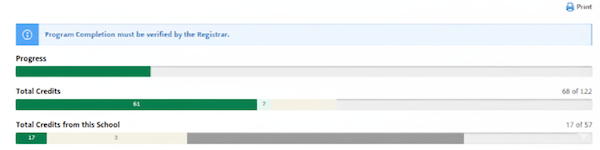
Class Level breakdown:
- Seniors have 90 or more credits completed
- Juniors have 60-89 credits completed
- Sophomores have 30-59 credits completed
- First Year students have 1-29 credits completed
IMPORTANT: All financial holds must be resolved prior to registration.
Online Registration Instructions
Registration Dates
Event | Spring 2027 and Winterim 2026 Registration |
|---|---|
Schedule opens on Self-Service | September 14, 2026 |
Graduate, Doctoral, Senior, Veteran, Athlete, Honors, Diocesan Scholar Registration Opens* | October 15, 2026 |
Junior Registration Opens* | October 19, 2026 |
Sophomore Registration Opens* | October 22, 2026 |
Current Freshmen Registration Opens* | October 26, 2026 |
Incoming Freshmen and New Transfer Student Registration Opens* | October 29, 2026 |
Non-degree and Visiting Student Registration Opens | October 29, 2026 |
Senior Citizens Registration Opens (class space available basis only) | First day of class |
*Unless otherwise noted all registrations must be completed through Self-Service
Drop/Add Adjustments
Registration adjustments are made through Self-Service, accessible via TigerOne. All students need their advisor's approval prior to registration adjustments. Students are personally responsible to initiate and complete drop/add adjustments. Drop/add adjustments will not be made after the date specified.
Once enrolled in a course, those students who are marked as “never attended” by their faculty during the census process will be administratively dropped from the course. Students who begin and then stop attending class will get the grade which they earn at the end of the semester.
Enrollment adjustments may affect academic progress toward degree completion and/or financial aid status. It is the student's responsibility to investigate the impact of registration adjustments on his or her continued academic progress and available funding.
Waitlist Management
If a class for which you would like to register is full, you will be able to sign up for a waitlist. Waitlists will start immediately after the maximum enrollment for the course has been reached. If a course has been selected for a waitlist, the “register” button will be changed to a “waitlist” button. If a seat becomes available, the next student on the waitlist will receive an automatically generated email notification to their Holy Family email address with instructions on registering for the open seat.
You will have 48 hours to claim the open seat. The time limit for registration will be stated in the notification email. If registration is not completed within that time, the next student on the waitlist will be given the opportunity to register. Students on waitlist are responsible for checking email frequently to avoid missing the opportunity to register.
For step-by-step instructions please refer to the Waitlist Instructions below. Please note, a hold on your account will prevent you from registering and waitlisting for a class.